Status: Pilot
Loads
Every load from booking to dispatch, stops, proof of delivery and invoice, with the next step shown on each one.
Solutions
Dispatch, fleet, billing, documents, tracking, integrations, reporting and a copilot that asks before it acts. Every feature carries an honest status, so you know what works today and what still needs a connection.
Dispatch & load management
Loads, drivers and papers you touch every day, with the next step shown on each load so nobody has to remember the process.
 Product screenshot · sample data
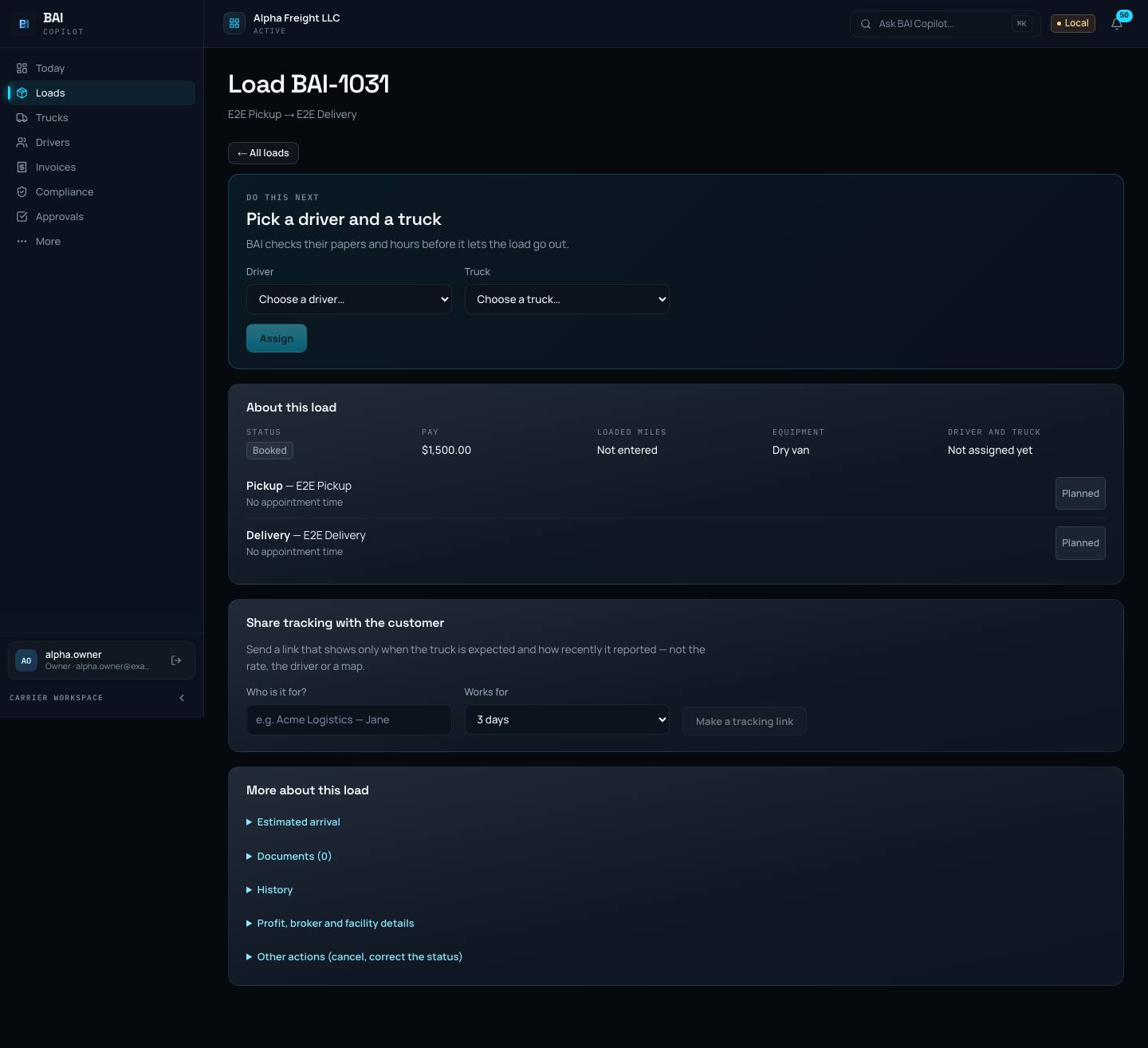
Every load from booking to dispatch, stops, proof of delivery and invoice, with the next step shown on each one.
Pick the truck and driver; BAI checks their papers, then sends stops, times and documents to the driver in the app, or by text or email.
Each stop with its arrival and departure, and a load status that moves as the driver reports in: booked, dispatched, in transit, delivered.
Rate confirmations filed against the load, and detention time recorded at the stop so it is there when you bill.
Forward broker emails in and BAI turns them into loads for you to check.
Fleet & drivers
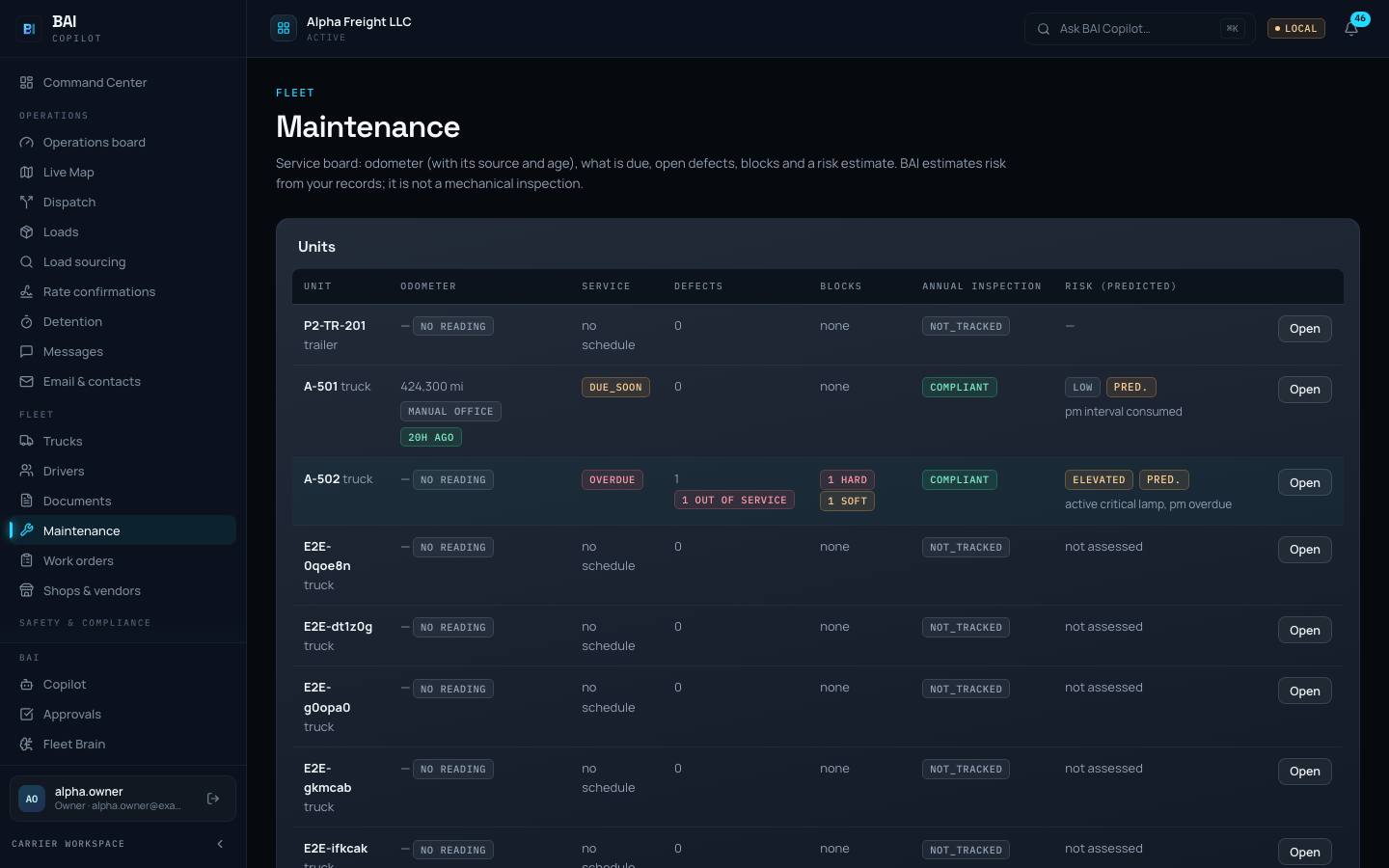
One roster for units and people: who is on which truck today, what is due, and what is holding a truck back.
 Product screenshot · sample data
Every unit with its papers, service history, current driver and what it earned.
Your drivers, their papers and phones, and which truck and load each one is on today.
Keep each driver’s hiring and qualification file together, with what is still missing.
Service due, defects, trucks held from driving, and a risk score worked out from your records.
a risk estimate, never a mechanic’s finding; a mechanic decides
Work orders, shops and vendors, with what each repair cost.
Record accidents and what followed, in one list.
awaiting counsel review before use as your official register
Billing & profitability
Invoices, collections, driver settlements and truck-level profit, with files for your bookkeeper and your factor.
 Product screenshot · sample data
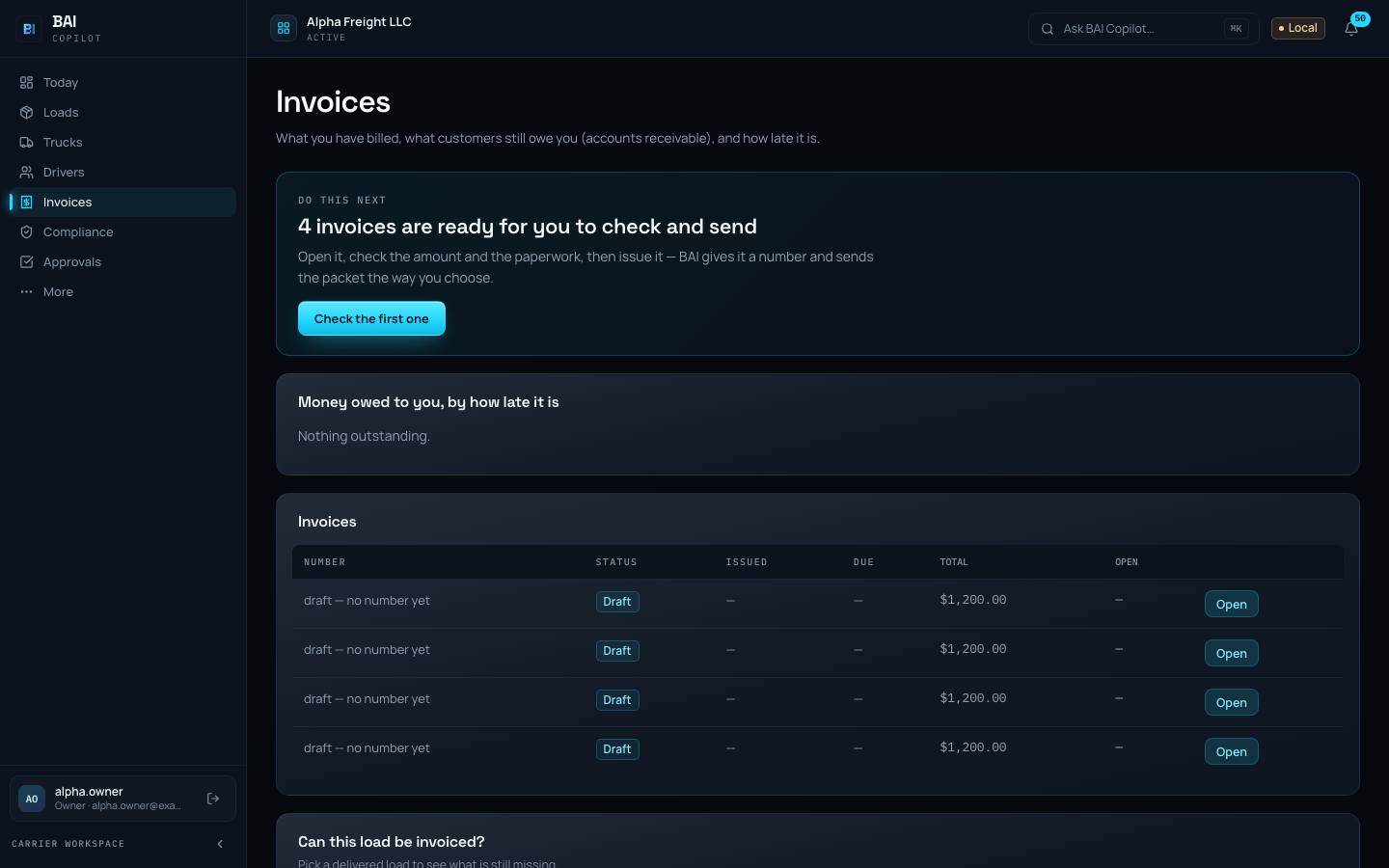
See what is ready to bill, what is owed and what is late; match payments, reconcile, and follow up on short pays.
Weekly settlements for you to check and approve, plus a payroll file for whoever runs payroll.
What each load and each truck made after the fuel, driver pay, tolls, maintenance and fixed costs you record, and the cost of each mile.
unknown costs stay unknown; BAI never shows a guess as a number
Files for your bookkeeper, factoring packets, and import of your factor’s funding report.
file-based
Documents & compliance
Proof of delivery, bills of lading, receipts, licences, medical cards, registrations and inspection reports, with their dates. BAI tracks and warns; it does not make you compliant.
 Product screenshot · sample data
Proof of delivery, bills of lading, rate confirmations and receipts in one place, with a review queue for anything unclear.
automatic reading is optional; a person can always review by hand
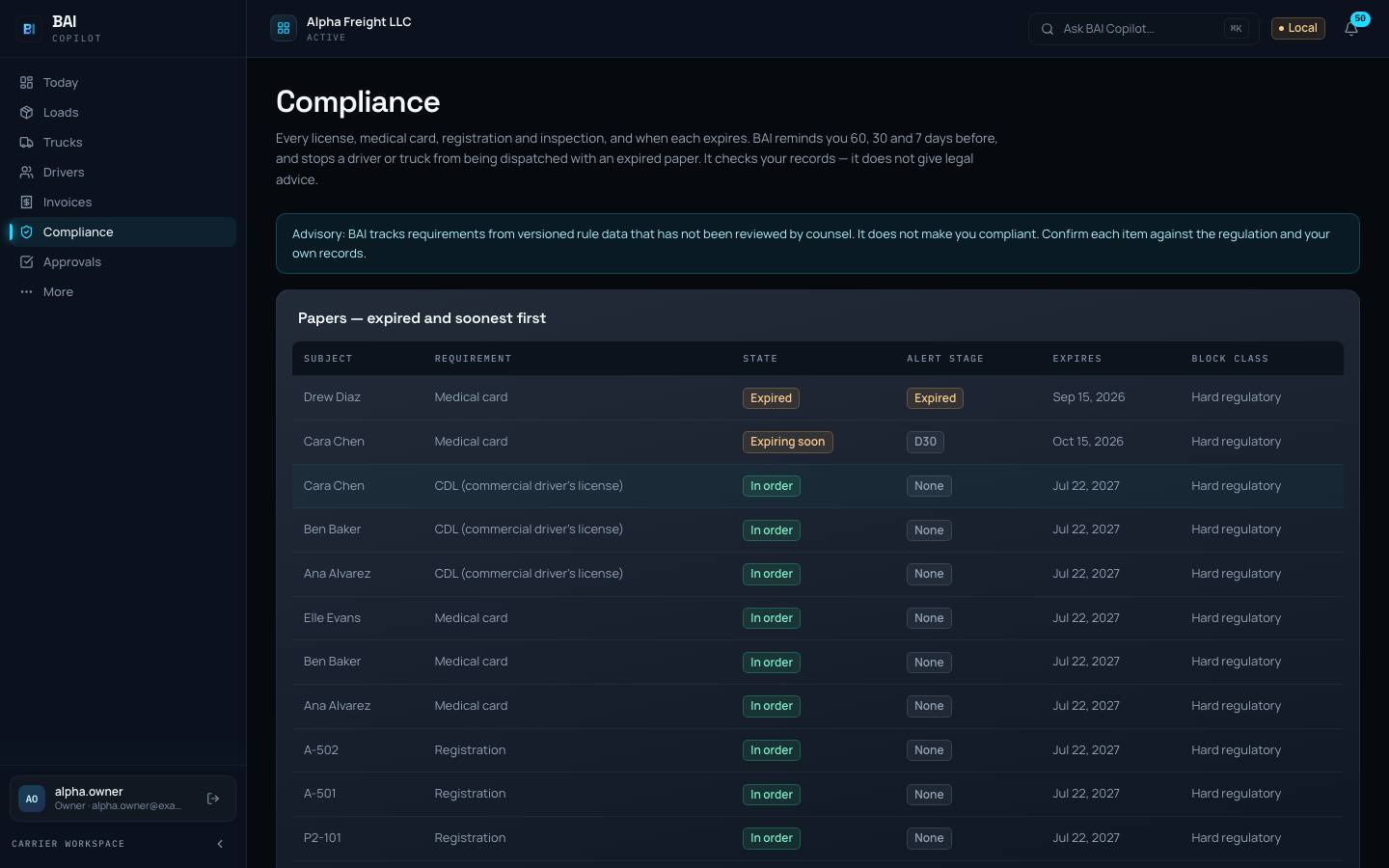
Licenses, medical cards, registrations and inspections with their expiry dates; dispatch flags an expired paper before a truck rolls.
BAI tracks and warns; it does not make you compliant
Driver vehicle inspection reports and defect photos from the driver app, kept with the truck and visible to maintenance.
Worksheets for IFTA, CT Highway Use Fee, NY HUT, IRP miles, Form 2290 and UCR, ready for you or your preparer.
prepares and exports only; it never files or pays; CPA review pending
Tracking & driver tools
A driver link or the driver app for stops, photos and position; a live map that shows how old every position is; tracking links a customer can open without seeing your rate.
 Product screenshot · sample data
Drivers see their stops, share their position, take proof-of-delivery photos and send messages.
Where each truck was last seen, from driver-app positions, with how fresh each position is. An old dot never looks current.
Give a customer a link that shows load status only: no rate, no driver identity, no history, and it expires.
Drivers who do not use the app get the same load details by text or email, and can report stops back the same way.
Integrations & automation
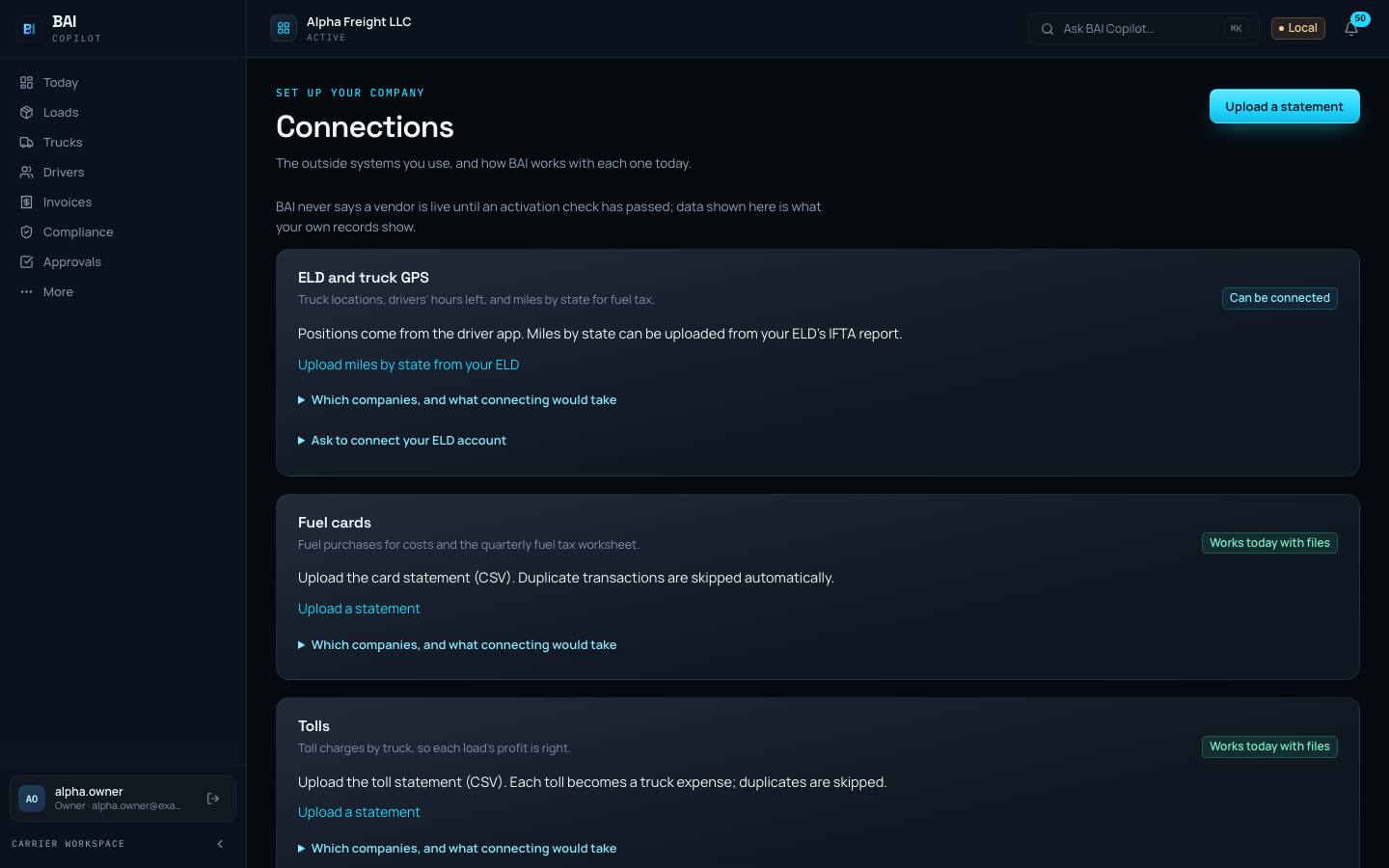
Everything works from statements, exports and forwarded emails first. Direct connections come one at a time, when you and the vendor are ready, and nothing connects until you turn it on.
 Product screenshot · sample data
Send your invoices and payments to QuickBooks Online.
export files (CSV) today; direct sync needs activation
Fuel and toll spend matched to trucks and trips.
import the statement file today
Positions, hours of service and odometer readings from your electronic logging device (ELD).
connections built, not switched on; BAI is not an ELD
Bring in loads you found on a load board.
enter by hand or forward the email today
Look up a broker’s operating authority before you book.
connection built, not switched on yet
Miles for each trip, for pay, cost and fuel tax.
straight-line estimates today, clearly labelled as estimates
Read your loads, invoices and positions from your own software.
no date promised
Reporting & week close
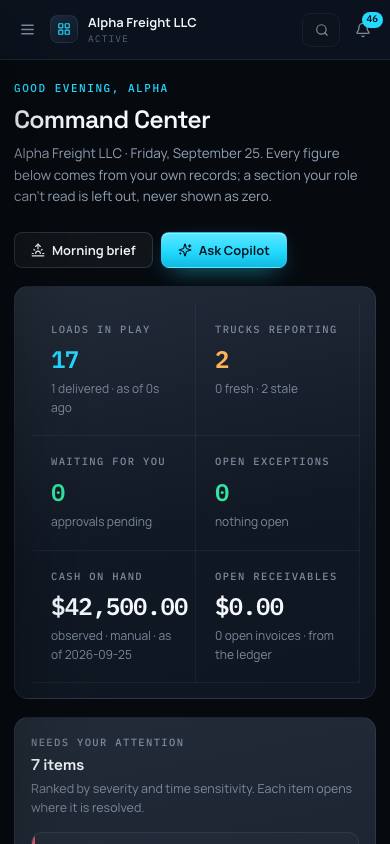
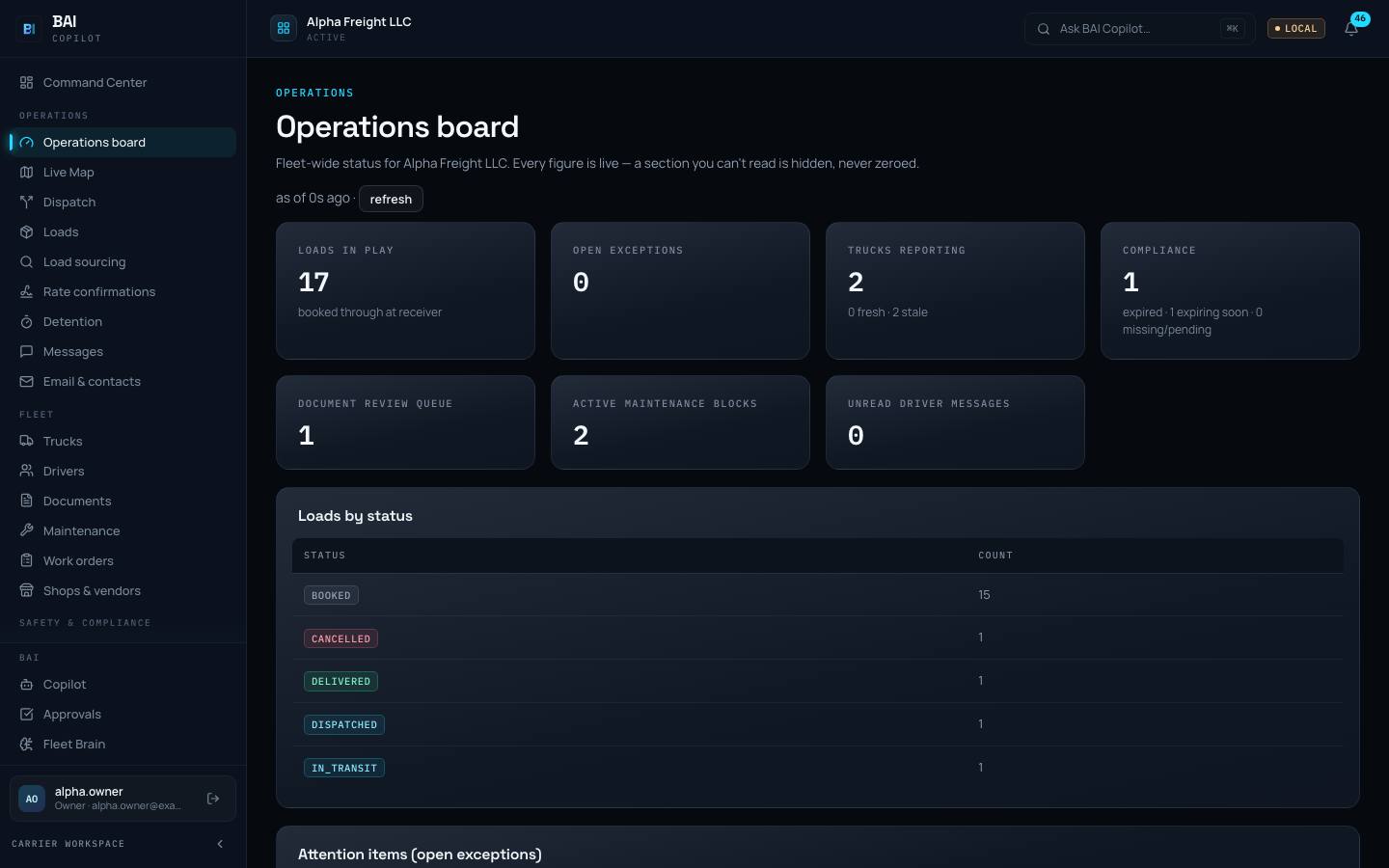
Loads in play, trucks reporting, cash coming in or late, deadlines, and the one thing to do next. Then a Friday close that checks pay, paperwork and invoices before the week is locked.
 Product screenshot · sample data
One page for what needs you: loads in play, trucks reporting, money coming in or late, deadlines, and the one thing to do next. A section BAI cannot read is hidden, never shown as zero.
A short written summary each morning of what happened and what needs you today.
Check pay, finish the paperwork, get invoices out, then lock the week.
Money in and money late, by customer and by age, from the same records the invoices come from.
Days to invoice, paperwork complete, pay checked and weeks closed, measured on your own records week by week.
thresholds agreed with you before a pilot starts
Carrier operations copilot
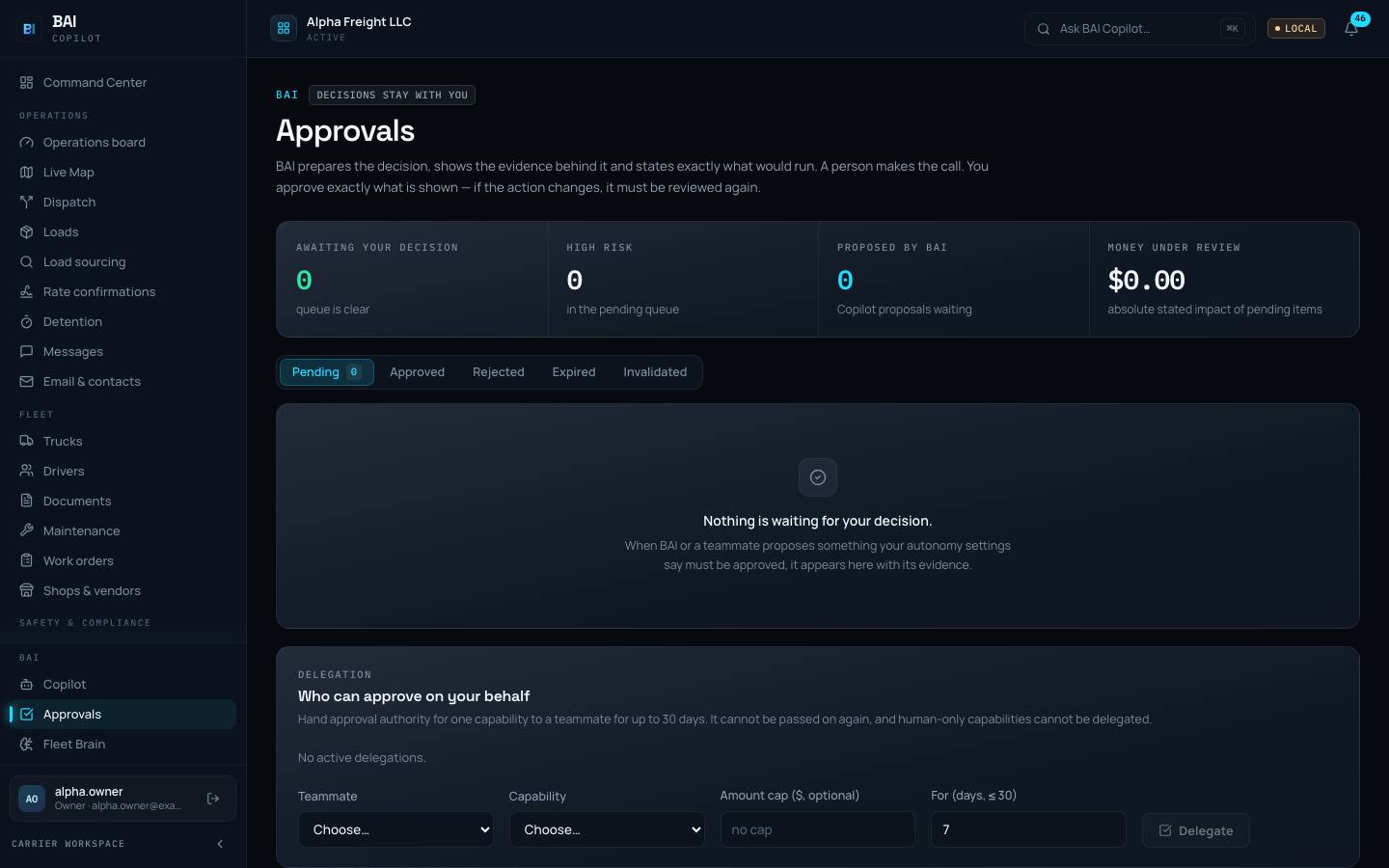
Ask about your loads, trucks and money and get answers from your own records. Anything that moves money or goes outside waits in Approvals with its evidence.
Ask questions about your loads, trucks and money and get answers from your own records.
answers come from your records; the full language model connection needs activation
Anything involving money or outside messages waits for a person to approve it, with the evidence attached.
 Product screenshot · sample data
Getting started & your team
Set up one step at a time, bring in your spreadsheets, and invite your people. Each role sees only what it needs.
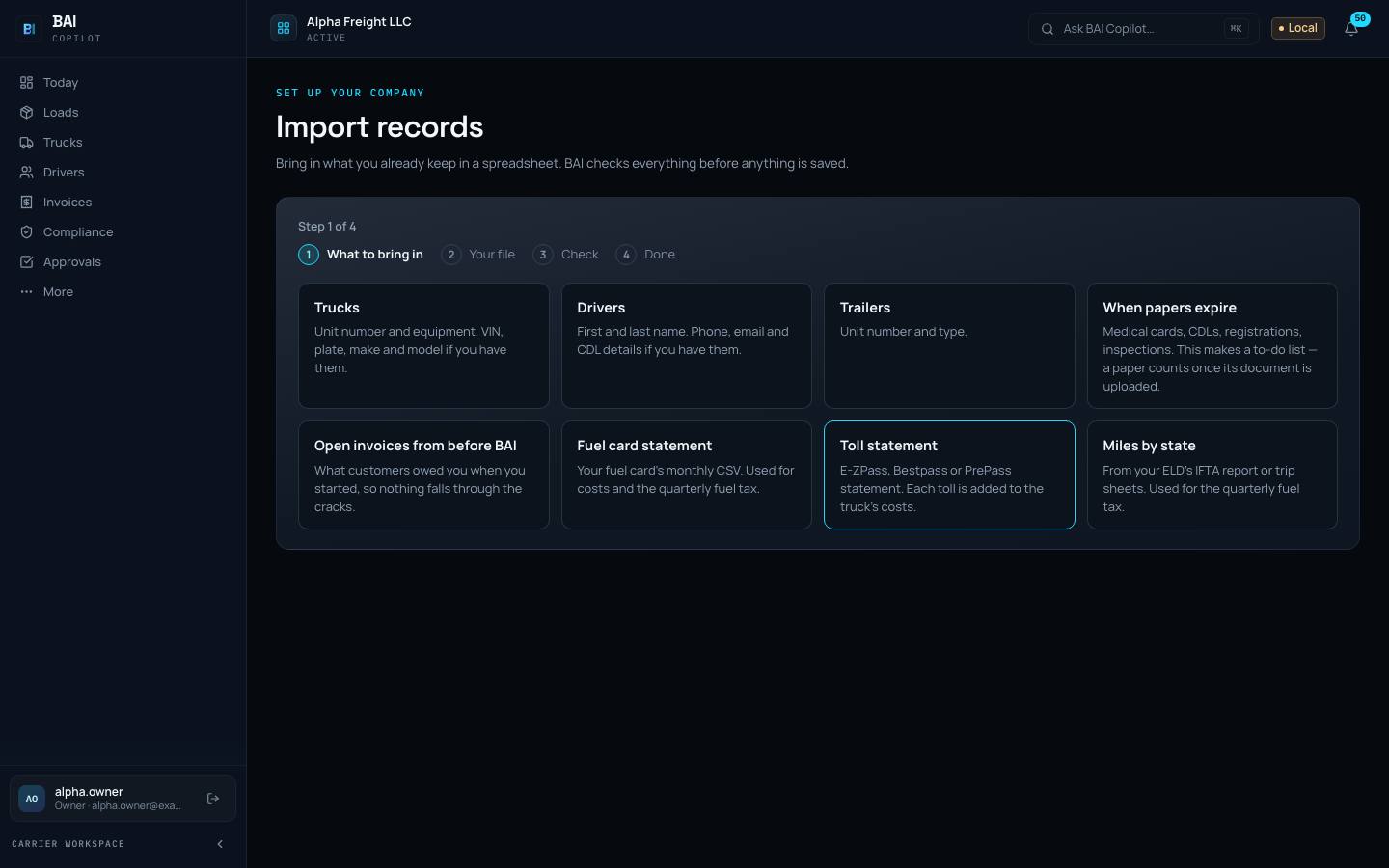 Product screenshot · sample data
Set up one step at a time. Bring in trucks, drivers, papers, open invoices and fuel and toll statements from a spreadsheet; a dry run shows every row before anything is created.
Invite your owner, dispatchers, bookkeeper, safety manager and drivers; each sees only what they need.
Sign in with your company’s own identity provider.
Trust
No independent security report yet, and no public price list. Pilot terms are agreed with each fleet.
An independent audit of how we run security.
not certified today
A public price list.
not published; pilot terms by agreement
The full list
The same list we use internally. If a row says Integration-dependent, the note tells you what works today instead.
| Capability | Status | Note |
|---|---|---|
| Dispatch & load management | ||
| Loads | Status: Pilot | No note |
| Assign and dispatch | Status: Pilot | No note |
| Stops and statuses | Status: Pilot | No note |
| Rate confirmations and detention | Status: Pilot | No note |
| Email intake | Status: Pilot | No note |
| Fleet & drivers | ||
| Trucks and trailers | Status: Pilot | No note |
| Driver roster and assignments | Status: Pilot | No note |
| Driver hiring | Status: Pilot | No note |
| Maintenance | Status: Pilot | a risk estimate, never a mechanic’s finding; a mechanic decides |
| Work orders | Status: Pilot | No note |
| Accident register | Status: Pilot | awaiting counsel review before use as your official register |
| Billing & profitability | ||
| Invoices and collections | Status: Pilot | No note |
| Driver pay and settlements | Status: Pilot | No note |
| Profit and cost per mile by truck | Status: Pilot | unknown costs stay unknown; BAI never shows a guess as a number |
| Books and factoring | Status: Pilot | file-based |
| Documents & compliance | ||
| Proof of delivery, bills of lading and receipts | Status: Pilot | automatic reading is optional; a person can always review by hand |
| Compliance and renewals | Status: Pilot | BAI tracks and warns; it does not make you compliant |
| Inspection reports (DVIR) | Status: Pilot | No note |
| Fuel tax and road taxes | Status: Pilot | prepares and exports only; it never files or pays; CPA review pending |
| Tracking & driver tools | ||
| Driver app | Status: Pilot | No note |
| Live map with position age | Status: Pilot | No note |
| Customer tracking links | Status: Pilot | No note |
| Dispatch by text or email | Status: Pilot | No note |
| Integrations & automation | ||
| QuickBooks Online | Status: Integration-dependent | export files (CSV) today; direct sync needs activation |
| Fuel cards and tolls (WEX, EFS, Comdata) | Status: Integration-dependent | import the statement file today |
| ELD and telematics (Motive, Samsara, Geotab) | Status: Integration-dependent | connections built, not switched on; BAI is not an ELD |
| Load boards (DAT, Truckstop) | Status: Integration-dependent | enter by hand or forward the email today |
| Broker check (FMCSA) | Status: Integration-dependent | connection built, not switched on yet |
| Routing miles | Status: Integration-dependent | straight-line estimates today, clearly labelled as estimates |
| API access for your own systems | Status: Planned | no date promised |
| Reporting & week close | ||
| Today and the operations board | Status: Pilot | No note |
| Morning brief | Status: Pilot | No note |
| Week close | Status: Pilot | No note |
| Cash: ready to bill, owed, late, paid | Status: Pilot | No note |
| Scorecard | Status: Pilot | thresholds agreed with you before a pilot starts |
| Carrier operations copilot | ||
| Ask in plain words | Status: Pilot | answers come from your records; the full language model connection needs activation |
| Approvals: BAI prepares, a person decides | Status: Pilot | No note |
| Getting started & your team | ||
| Getting started and import from spreadsheets | Status: Pilot | No note |
| Team roles | Status: Pilot | No note |
| Enterprise single sign-on | Status: Planned | No note |
| Trust | ||
| SOC 2 report | Status: Planned | not certified today |
| Published pricing | Status: Not offered | not published; pilot terms by agreement |
A demo walks through your loads, your trucks and your week, with the status of every piece shown as it is.